Skip to Content
Mail Client NexGen — unified email workspace for Odoo 19

Have questions or need customization?

The NexGen Solutions team is here to help! Whether you need support, installation assistance, or a custom feature developed, we're just a click away.

NexGen Solutions
Published by
NexGen Solutions
Odoo 19 App
Odoo 19 · Community · Enterprise · Odoo.sh · On-Premise

Mail Client NexGen

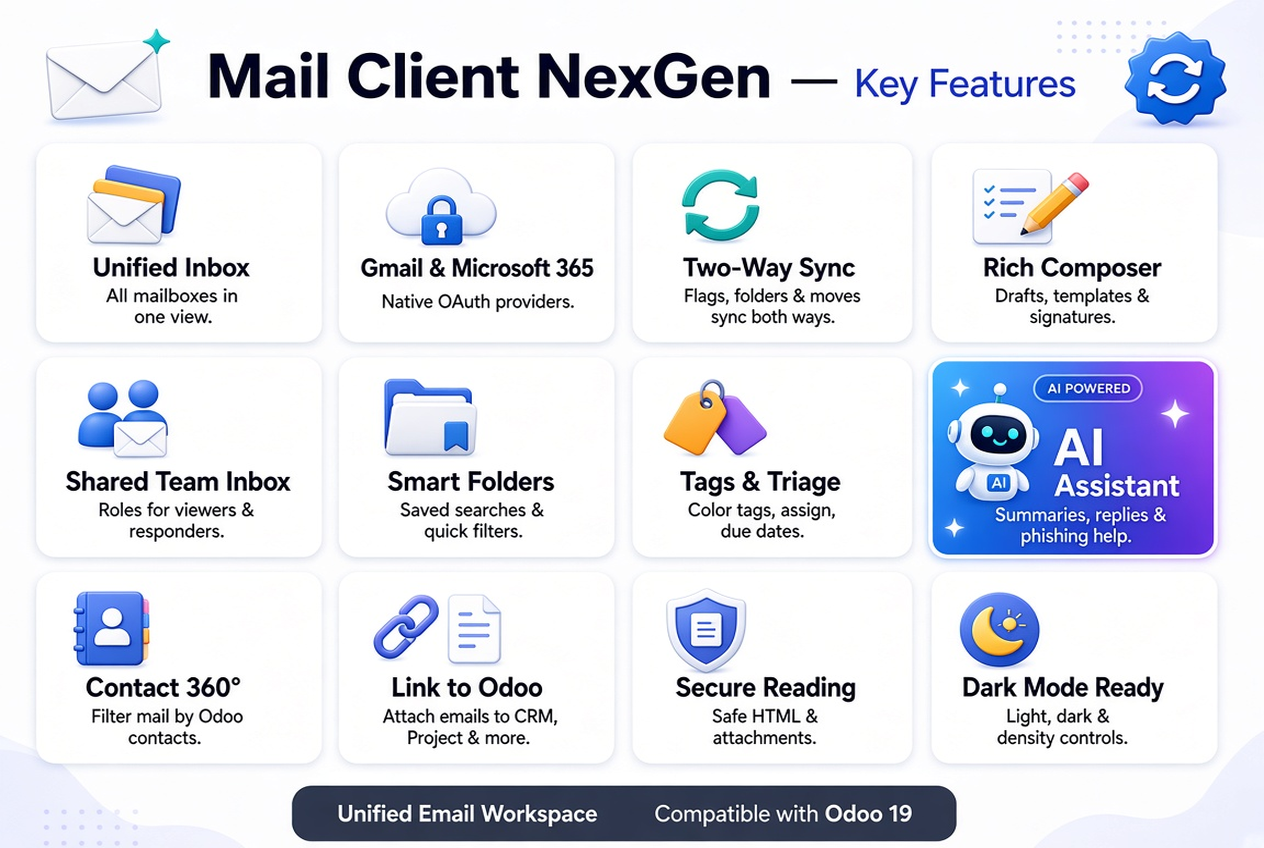
Mail Client NexGen is a native unified email workspace for Odoo 19: connect Gmail, Microsoft 365 and IMAP/SMTP mailboxes, sync two-way, collaborate in shared inboxes, compose richly, optionally use AI, and link messages to CRM, Helpdesk, Project, Calendar and Documents — from one module.

Multi-mailbox inbox Two-way sync OAuth2 / PKCE Shared team inboxes Optional AI assist Author: NexGen Solutions
About this app

What does this app do in Odoo 19?

Mail Client NexGen brings a modern email client inside Odoo — folders, threads, compose, tags, shared access, sync and operations — so teams stop switching between Gmail, Outlook and the ERP. Link emails to Odoo records and keep triage, assignments and audit in one place.

Technical name: mailclient_nexgen. Works on Odoo 19 Community, Enterprise, Odoo.sh and on-premise. License: OPL-1.

  • Gmail, Microsoft 365 and generic IMAP/SMTP in one workspace
  • Two-way sync for flags, folders, moves and read state
  • Shared inboxes with Viewer / Responder / Manager roles
  • Optional AI summaries, reply suggestions and phishing help
  • Send from any record chatter with Mail Account, From Name, Cc and Bcc
  • Publisher: NexGen Solutions · Support: nexgensolutionsodoo@gmail.com
Main screen

Workspace — inbox, threads and compose

One OWL app for mailboxes, folders, reading, composition, tags, shared access and operations.

Mail Client NexGen module icon Mail Client NexGen for Odoo 19 — main workspace overview
At a glance

Feature map

Explore the capabilities below. Open each tab for screenshots and detail.

📧Unified Inbox
✉️Multi Compose Popups
📨Multi-Mailbox
✍️Rich Composer
🔄Two-Way Sync
📁Folder Sync
🔐OAuth2 / PKCE
🤖AI Assistant
Signatures
📄Templates
Schedule & Snooze
⏱️SLA Policies
👥Shared Inboxes
🔗Link to Odoo
💬Chatter Send Message
⚙️Configuration
🏷️Tags & Smart Folders
🛠️Operations Cockpit
🌙Dark Mode
How it works

Install once — connect mailboxes and go live

Add accounts with OAuth or IMAP credentials, sync folders, invite teammates to shared inboxes, and start working from a single Odoo workspace.

1

Install

Install from Apps and open the Mail Client menu.

2

Connect mailboxes

Gmail / Microsoft 365 OAuth or IMAP/SMTP credentials.

3

Sync & share

Pull folders, enable two-way sync, assign shared roles.

4

Go live

Read, reply, triage, link to Odoo and automate with AI.

Product cover

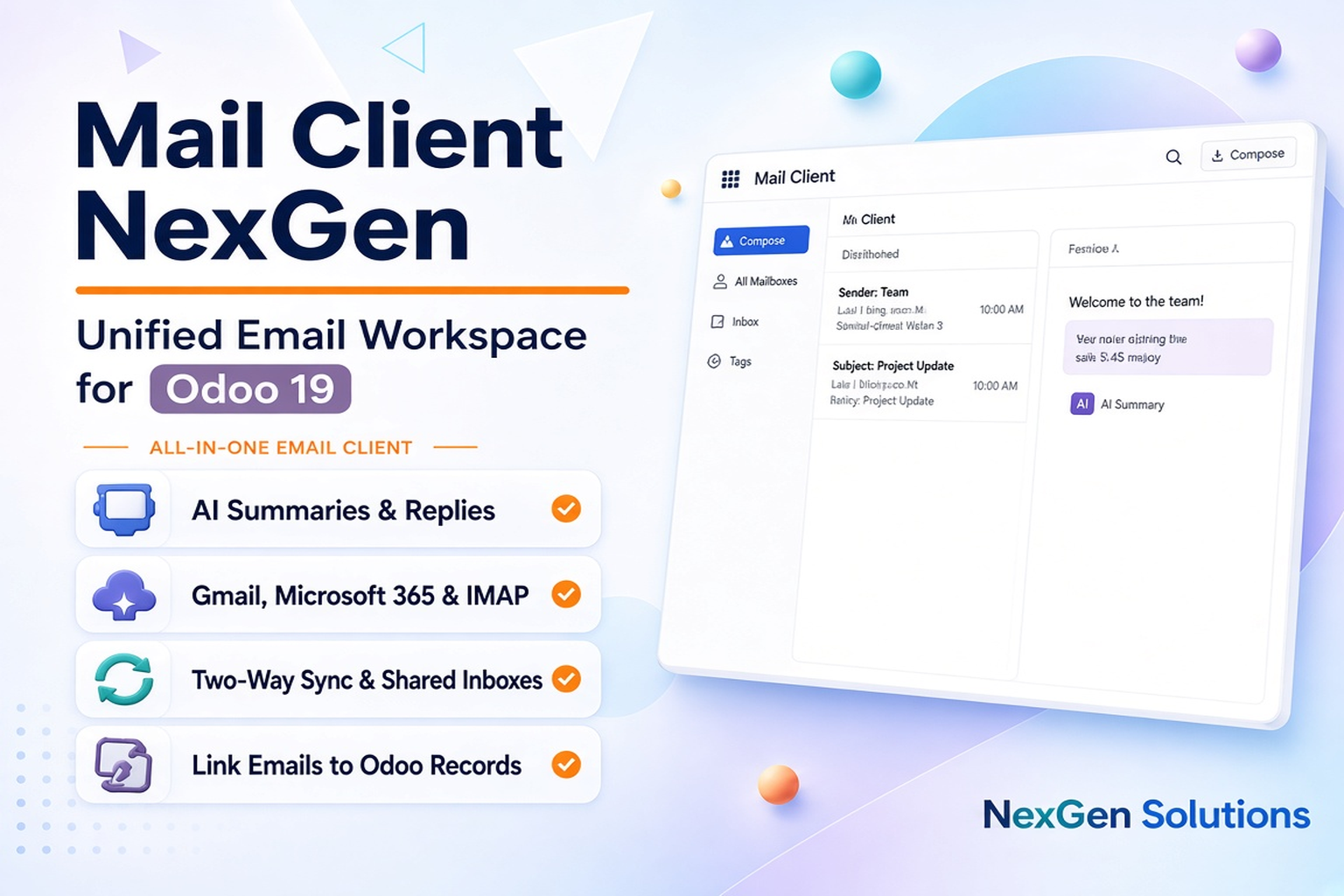
Email that lives inside Odoo

Stop context-switching. Keep conversations next to leads, tickets, tasks and documents with a dedicated mail workspace.
✓ Native OWL client
✓ Multi-provider accounts
✓ Threaded reading
✓ Safe HTML rendering
Mail Client NexGen banner — this app
Main workspace

Inbox, folders and message pane

A familiar three-pane layout adapted for Odoo: switch mailboxes, browse folders, open threads and act without leaving the ERP.

✓ Nested folders
✓ Contact filters
✓ Dark mode
✓ Undo support
Main workspace screenshot — this app
Workspace

Compose, multi-mailbox, unified inbox & rich editor

Click Compose from the Odoo navbar systray to open floating popups — open several at once, write side by side, and keep working without leaving your current screen.

Highlight · Multi compose popups

Navbar Compose — click again to open another popup

The envelope icon in the Odoo top bar opens a floating Mail Client composer. Click it again and a second (or third) popup opens beside the first — perfect for writing a quote, a follow-up and a meeting invite at the same time.
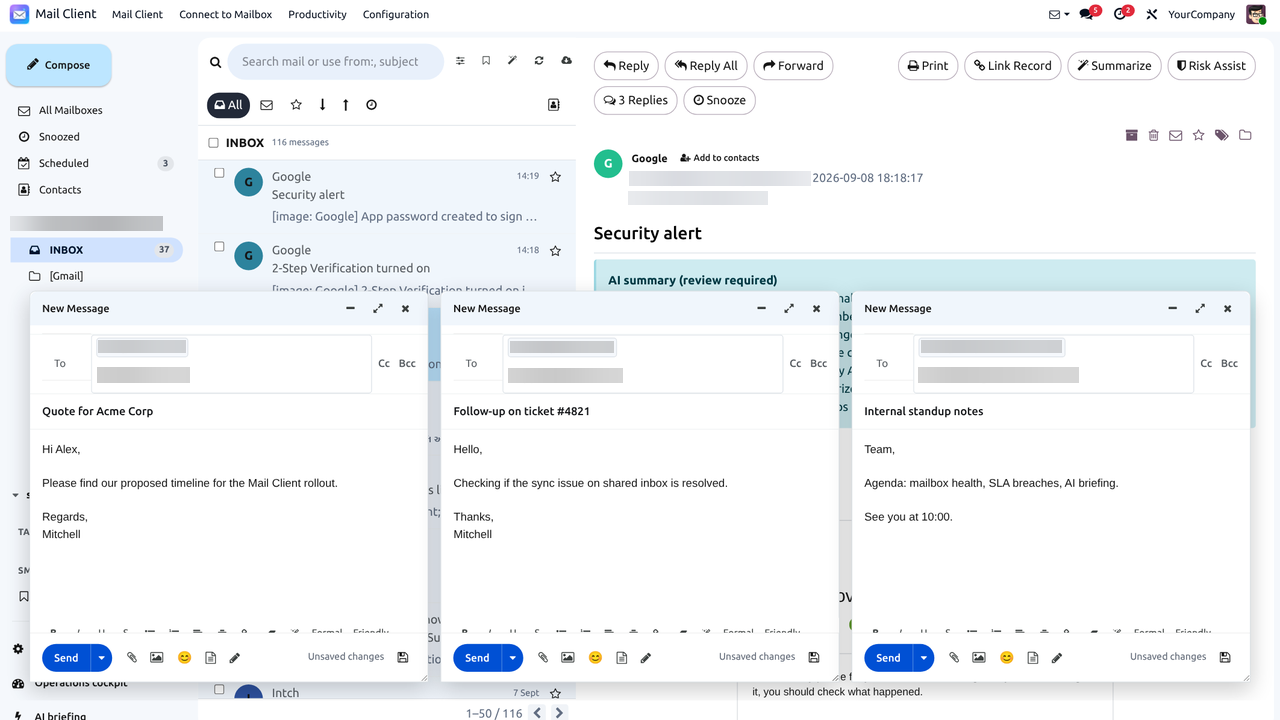
Multiple Mail Client compose popups open side by side
✓ Systray compose icon
✓ Multiple floating windows
✓ Offset side-by-side layout
✓ Stay on any Odoo screen
Step 1 · Navbar

Compose from the Odoo systray

Mail Client adds an envelope icon to the top navbar. Click it from Sales, CRM, Discuss or any backend screen to start composing without opening the full Mail Client app first.
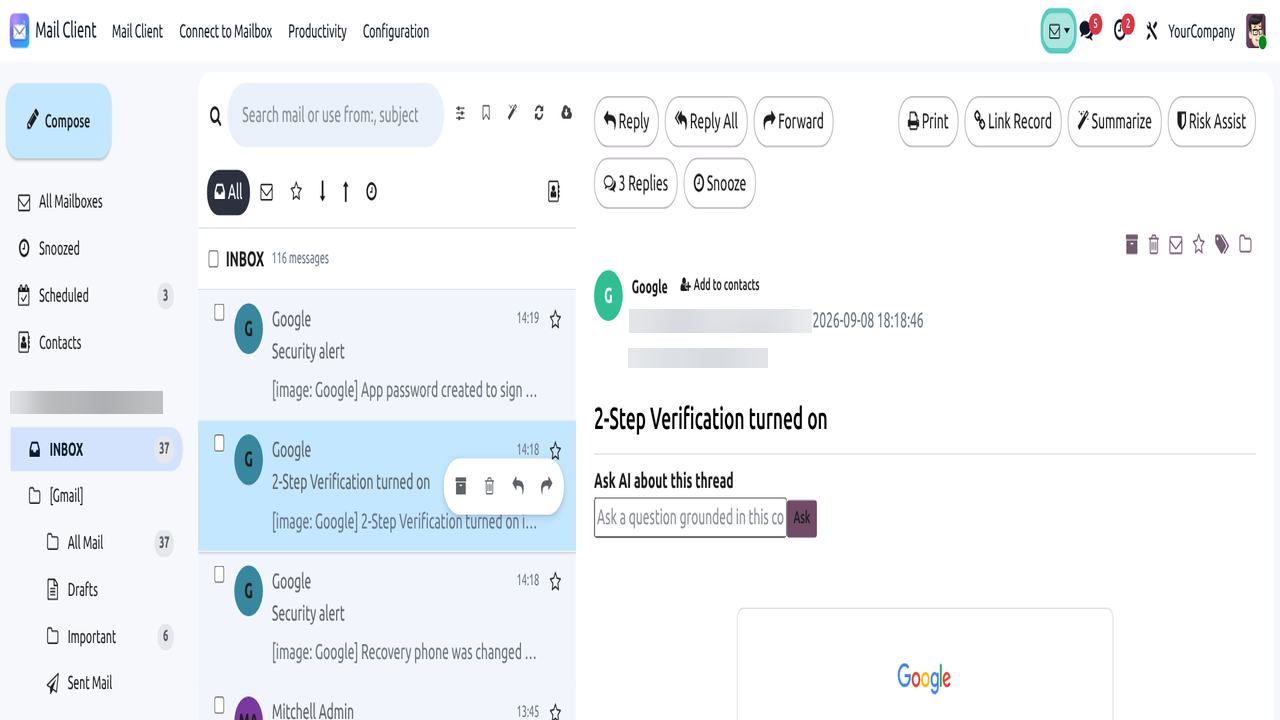
✓ Always in the top bar
✓ Tooltip: Compose New Email
✓ Works on any Odoo menu
✓ Plus Compose in the app sidebar
Odoo navbar systray Compose New Email icon
Step 2 · Floating popup

A full compose window floats over Odoo

Each click opens a dedicated floating composer: From identity, To / Cc / Bcc chips, subject, rich HTML body, attachments, AI writing helpers, Send and schedule options — with minimize, maximize and close controls.
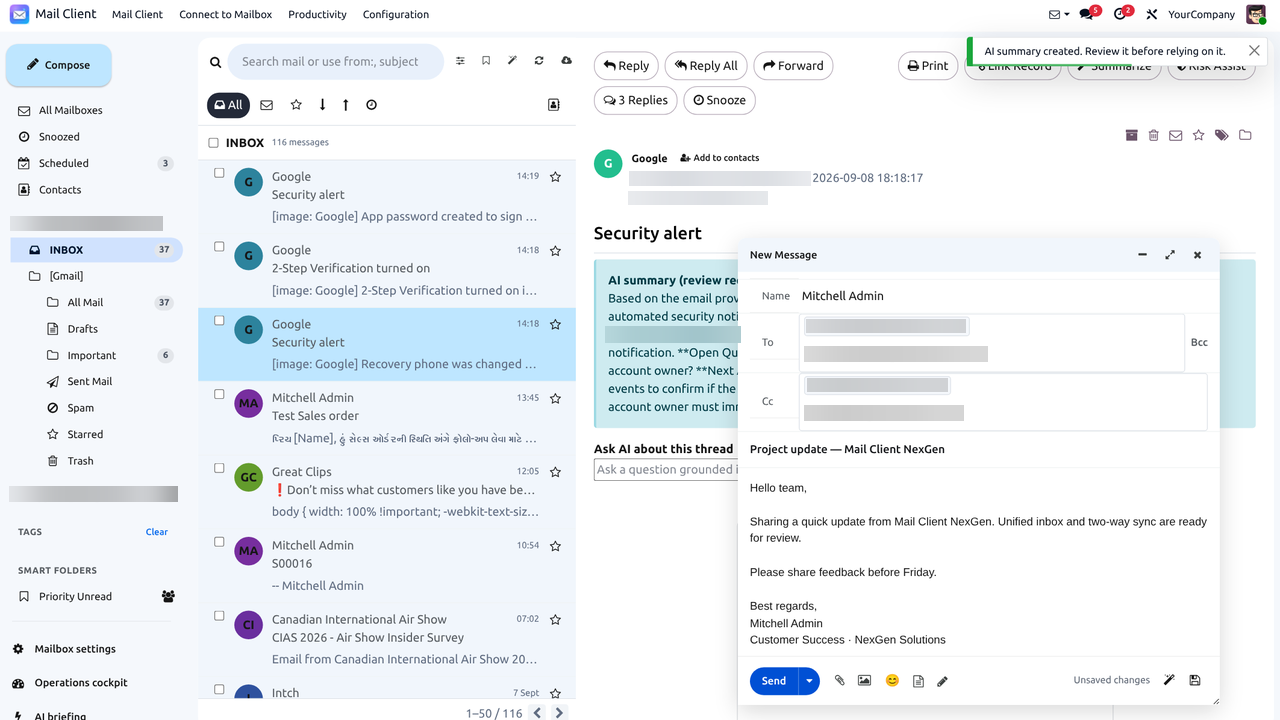
✓ Minimize / maximize / close
✓ Account & identity picker
✓ Does not leave current page
✓ Autosaved drafts
Single floating compose popup over Odoo
Step 3 · Click again

Open multiple compose popups at once

Each systray click adds another independent popup, offset beside the previous one. Draft a customer quote, an internal follow-up and a meeting invite in parallel — close or minimize each window separately when you are done.

✓ One click = one new popup
✓ Side-by-side offset windows
✓ Independent drafts per popup
✓ Close one without losing others
Three Mail Client compose popups open together
Inside each popup

Recipients, Cc/Bcc, AI tools & Send

Every popup is a complete composer: recipient chips with suggestions, optional Cc/Bcc, subject, rich editor, attachments, AI improve / formal / friendly / grammar / translate helpers, Send, schedule send and discard draft.
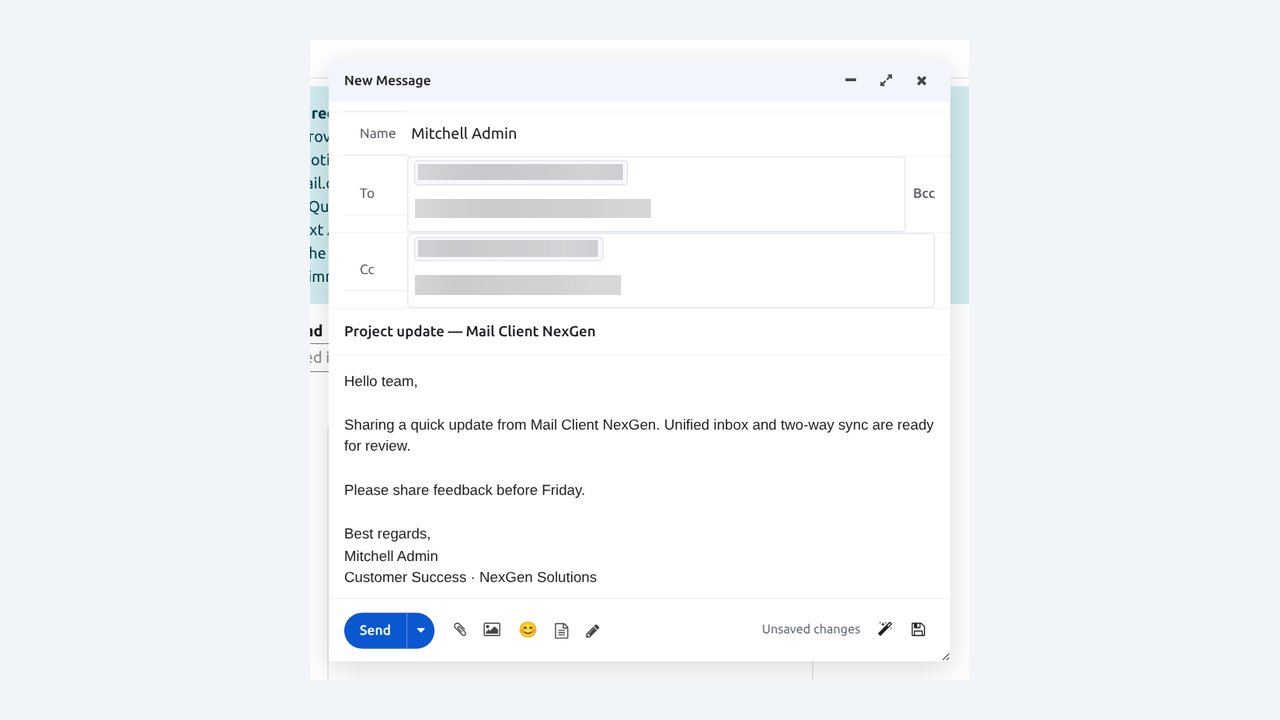
✓ To / Cc / Bcc chips
✓ AI writing helpers
✓ Attachments & signatures
✓ Send or schedule
Compose popup details with Cc Bcc AI and Send
Also in the app

Compose button inside Mail Client

Inside the Mail Client workspace, the large sidebar Compose button opens the same rich composer while you browse folders and threads. Use the systray when you are elsewhere in Odoo; use the sidebar when you are already in Mail Client.
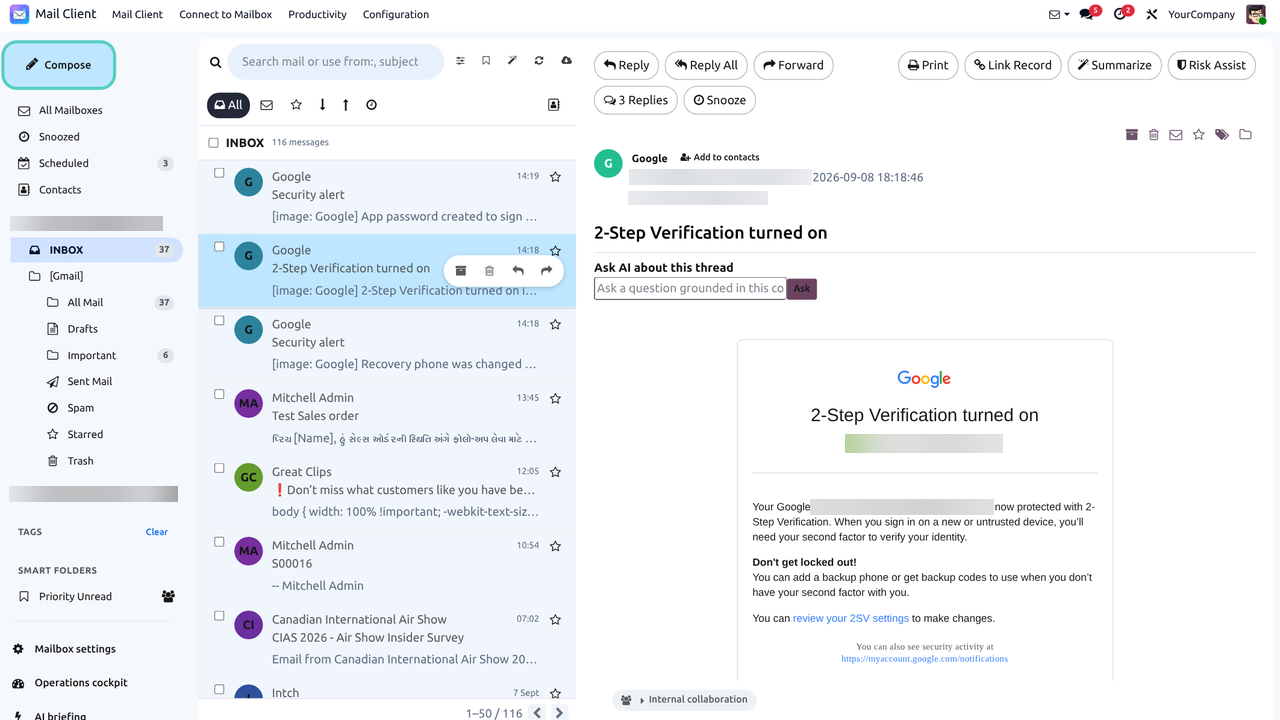
✓ Large sidebar Compose
✓ Keyboard shortcut: c
✓ Reply / Forward from threads
✓ Same rich editor
Compose button in Mail Client sidebar
Feature 08

Multiple mailbox connection

Connect Gmail, Microsoft 365 and generic IMAP/SMTP accounts and work them side by side. Switch All Mailboxes or a single account from the sidebar without leaving Odoo.
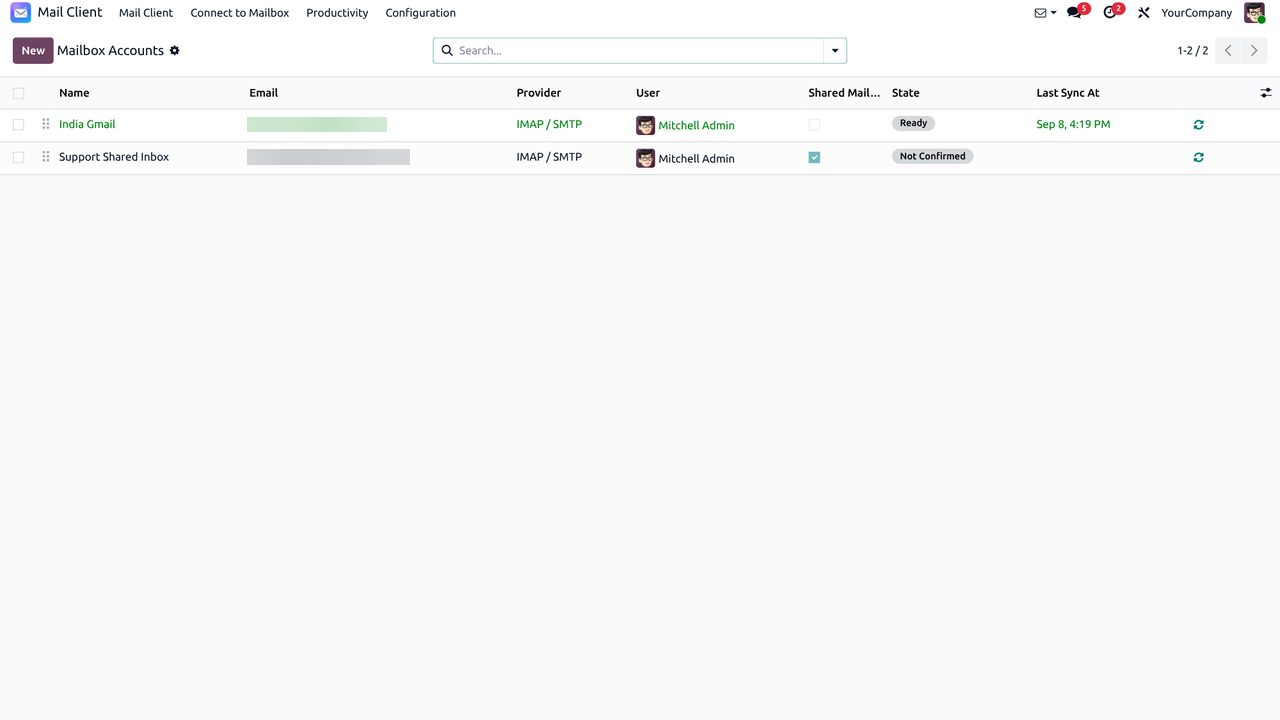
✓ Gmail + Microsoft 365 + IMAP
✓ Side-by-side accounts
✓ All Mailboxes view
✓ Per-account switcher
Multiple mailbox connection — this app
Feature 01

Unified inbox & threaded reading

Browse nested folders, open conversation threads and filter by Odoo contacts in a familiar three-pane workspace adapted for Odoo 19.
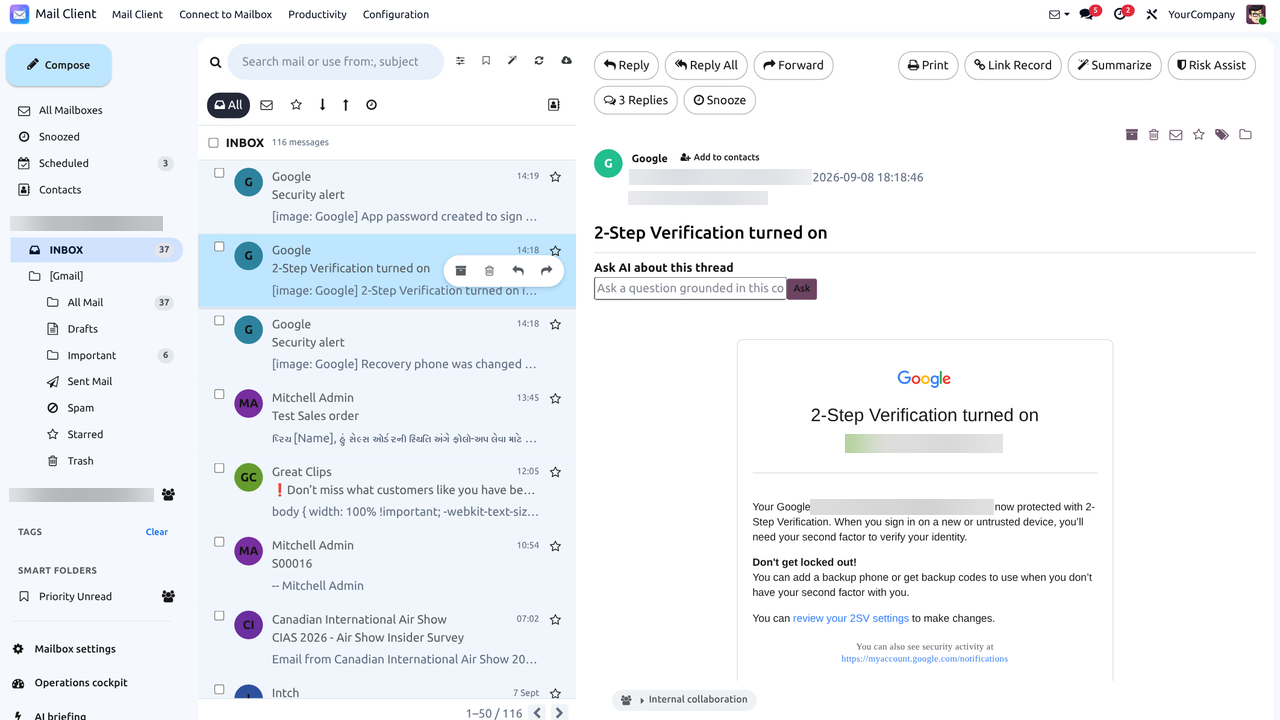
✓ Combined or per-account views
✓ Nested folders & threads
✓ Contact-aware filters
✓ Safe HTML rendering
Unified multi-mailbox inbox — this app
Feature 02

Rich composer — drafts, attachments, reply tools

Compose professional HTML mail with attachments, images, drafts and reply / reply-all / forward without breaking thread context.
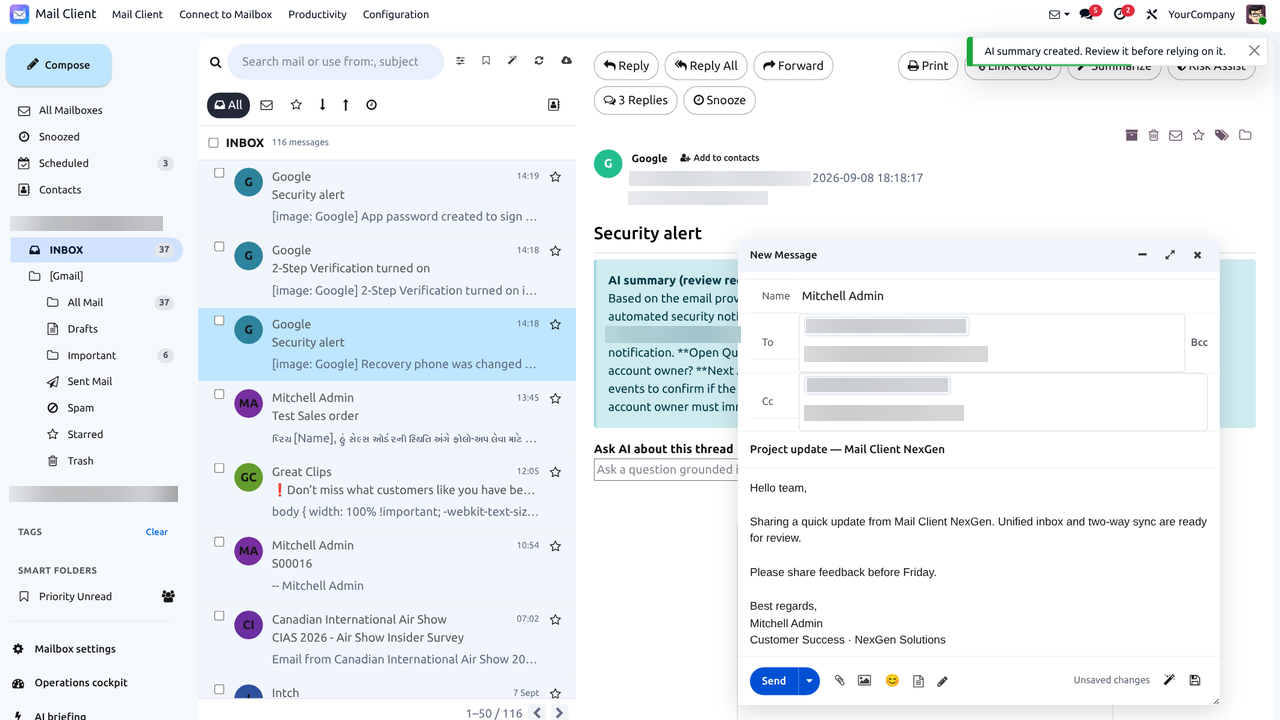
✓ Drafts & autosave
✓ Attachments & images
✓ Reply / Reply all / Forward
✓ HTML editing
Rich composer — this app
Providers & folders

OAuth, two-way sync, folder sync & operations

Authenticate securely, keep provider state aligned, sync folders with Sync Now, and operate with scheduled jobs plus an audit trail.

Feature 04

Providers, OAuth2 / PKCE & two-way sync

Authenticate with OAuth2 and PKCE for Gmail and Microsoft 365, or use IMAP/SMTP with encrypted secrets. Flags, folders, moves and read state synchronize both ways so the provider and Odoo stay consistent.
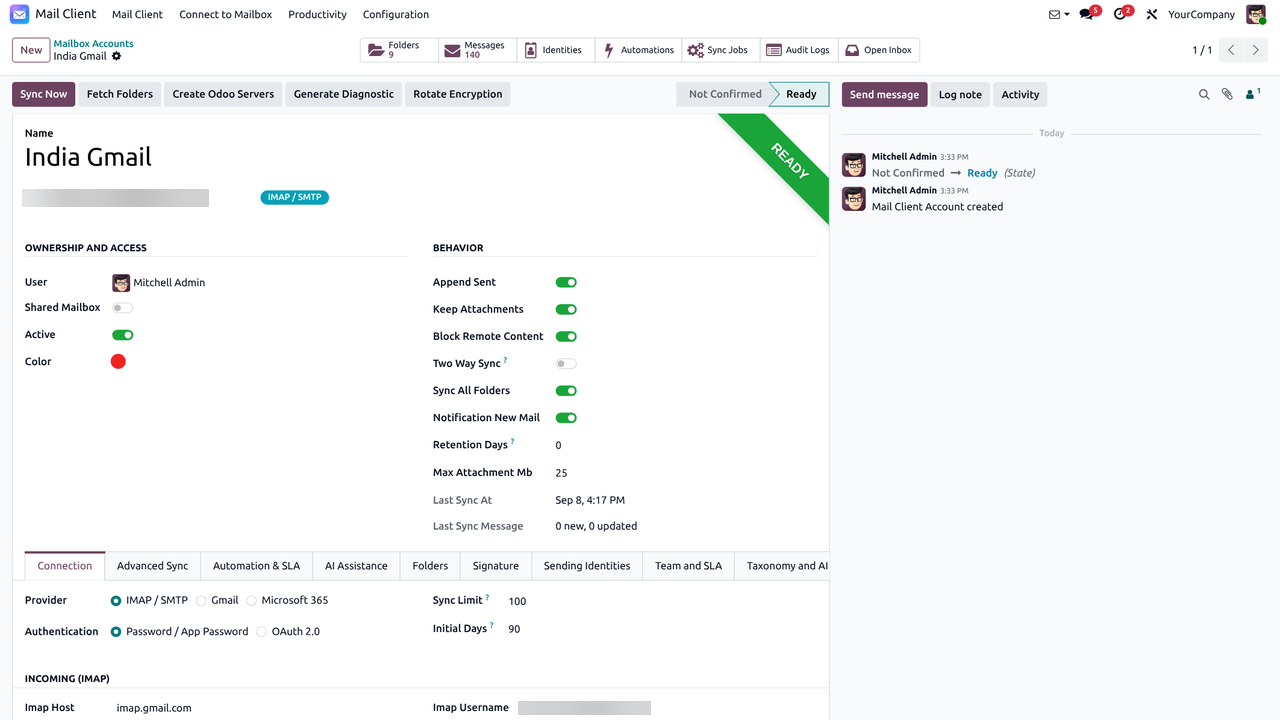
✓ Gmail & Microsoft Graph
✓ IMAP / SMTP fallback
✓ Encrypted credentials
✓ Flags / folders / reads
Providers and sync — this app
Feature 09

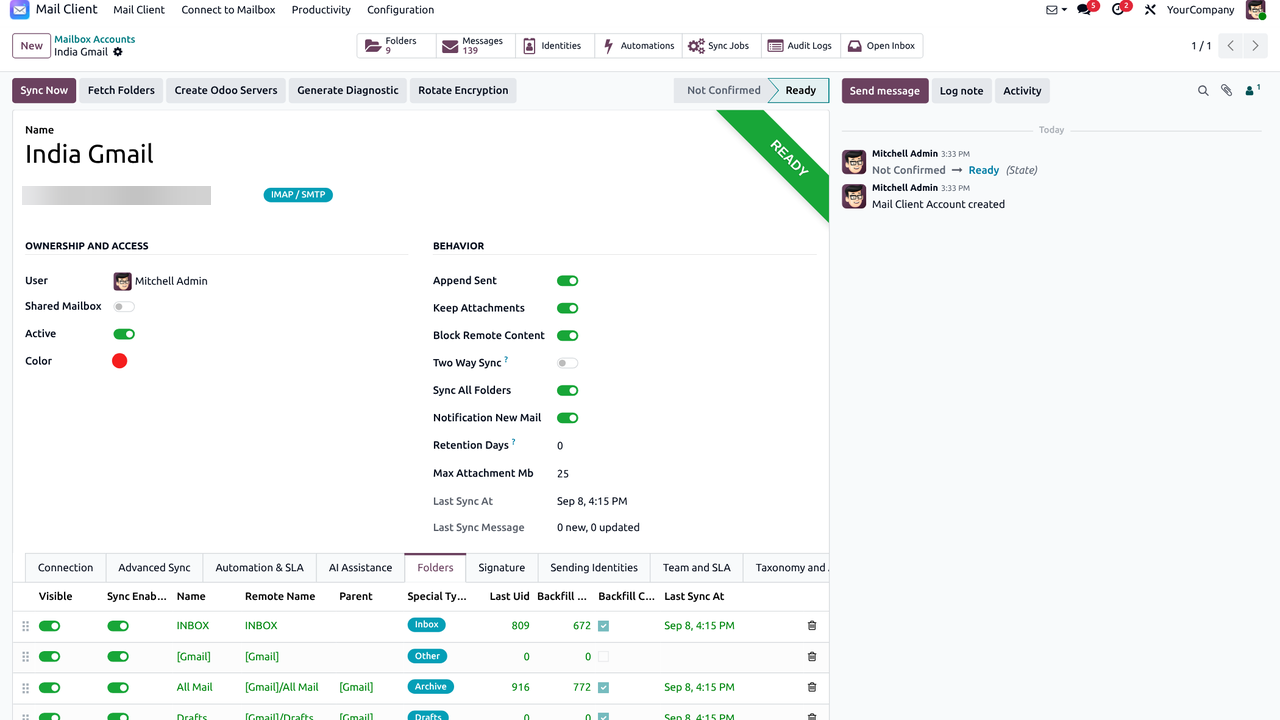
Folder sync, Sync Now & two-way toggle

Pull remote folders into Odoo, run an immediate Sync Now when you need fresh mail, and enable or disable two-way sync per mailbox so teams know whether actions update the provider.
✓ Folder hierarchy sync
✓ Sync Now on demand
✓ Two-way sync toggle
✓ Per-mailbox control
Folder sync and Sync Now — this app
Operations

Operations cockpit, audit & scheduled sync

Monitor mailbox health, review sync jobs, reconcile differences and keep an audit trail of key actions. Cron-based sync keeps inboxes fresh without manual polling.

✓ Sync status dashboard
✓ Scheduled jobs
✓ Audit events
✓ Reconciliation helpers
Operations and security overview — this app
Optional · opt-in providers

AI summaries, reply suggestions & phishing help

Core IMAP/SMTP mail works without AI. Enable OpenAI, Gemini, Anthropic or a local provider when your policy allows — per mailbox and under administrator control.

Optional AI

Assist without auto-sending

Summarize threads, draft replies and get phishing guidance — you always review before send.

Feature 03

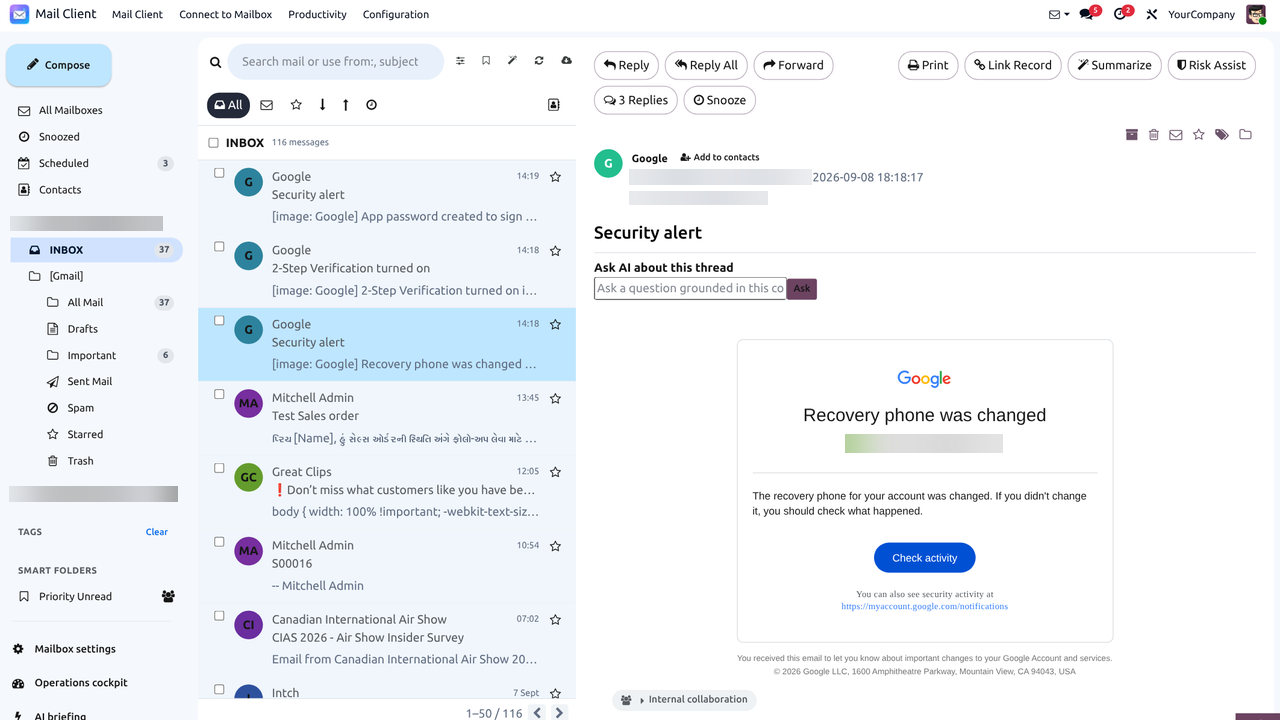
AI assistant in the reading pane

Summarize long threads, draft reply suggestions and get lightweight phishing guidance without leaving the message view. You review and send — AI never auto-sends.
✓ Thread summaries
✓ Reply suggestions
✓ Phishing assistance
✓ Human-in-the-loop send
AI assistant — this app
Providers

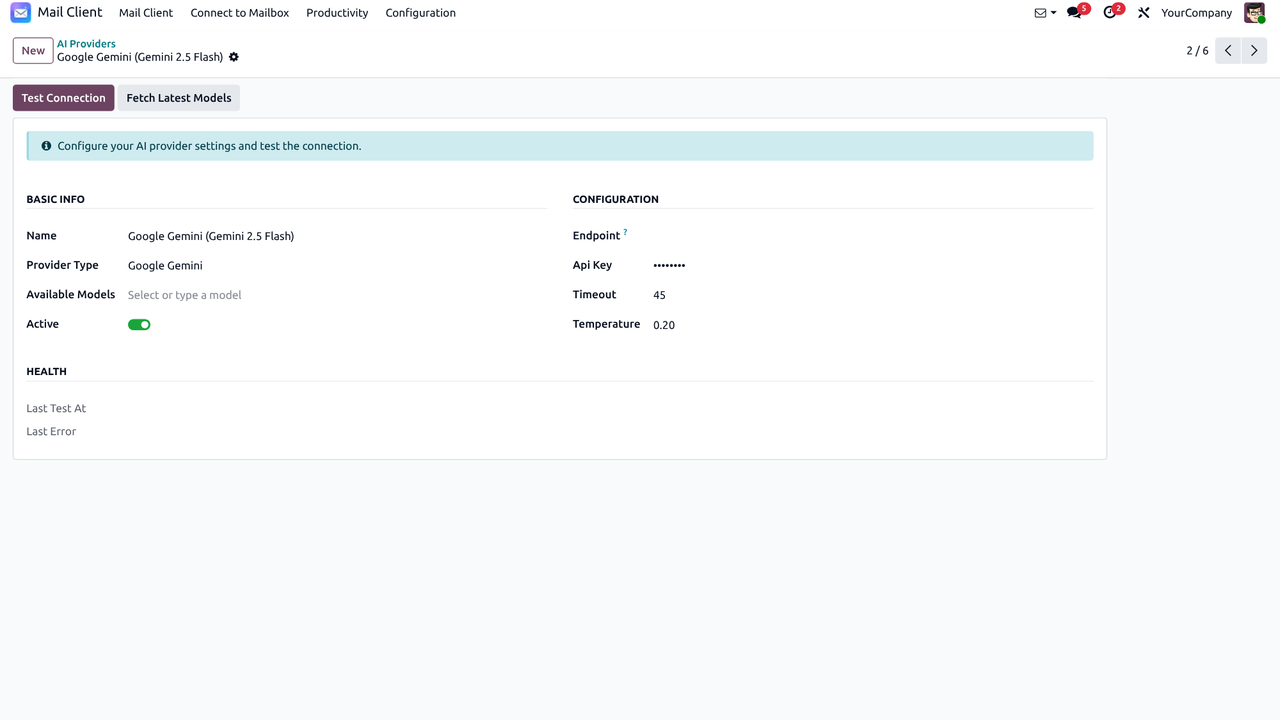
Opt-in AI providers under admin control

Choose the provider that fits your policy: OpenAI, Gemini, Anthropic, Grok, DeepSeek or a local OpenAI-compatible endpoint. AI stays disabled until an administrator configures a provider and enables it on a mailbox.
✓ OpenAI
✓ Gemini
✓ Anthropic
✓ Local / OpenAI-compatible
AI provider options — this app
Productivity

Signatures, templates, schedule, snooze & SLA

Brand every reply, reuse proven copy, defer follow-ups and keep shared-inbox service levels visible.

Feature 11

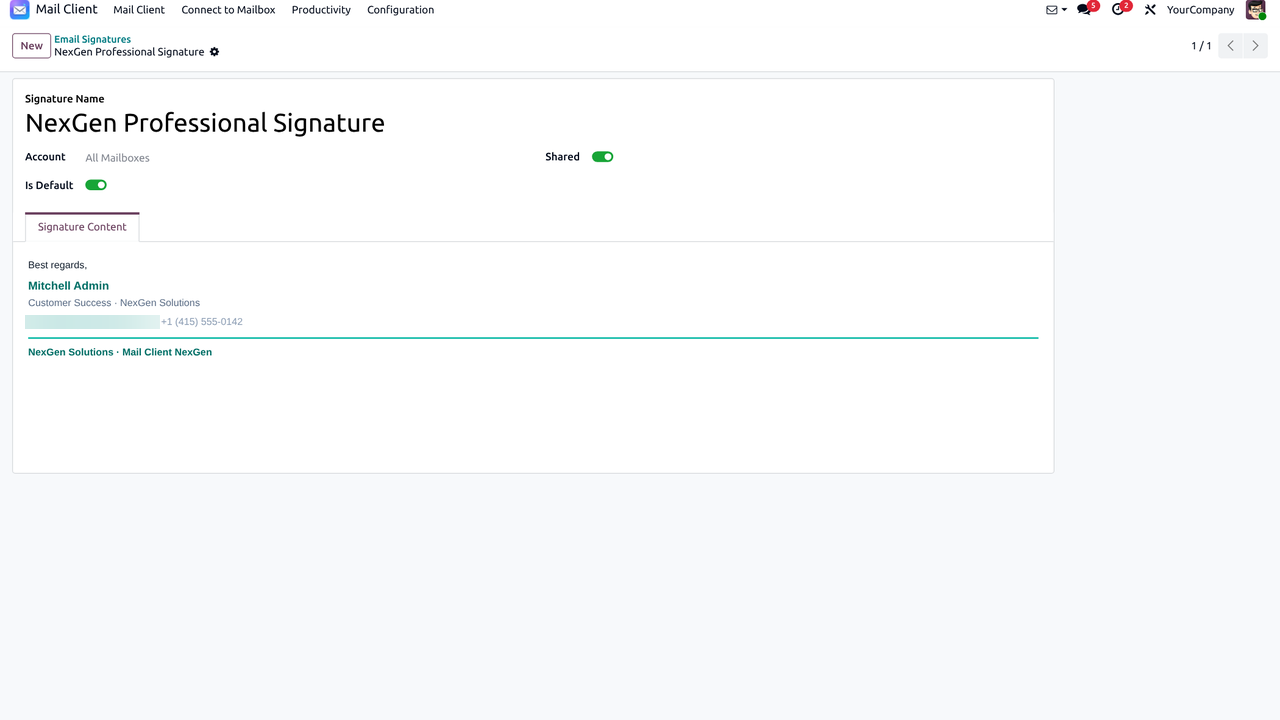
Email signatures

Create and manage multiple signatures for personal and shared mailboxes. Pick the right signature when composing so every reply stays on-brand.
✓ Multiple signatures
✓ Per-mailbox defaults
✓ HTML signature support
✓ Quick pick in composer
Email signatures — this app
Feature 14

Reusable email templates

Save reusable HTML templates for common answers and insert them while composing. Standardize support, sales and ops replies without starting from a blank page.
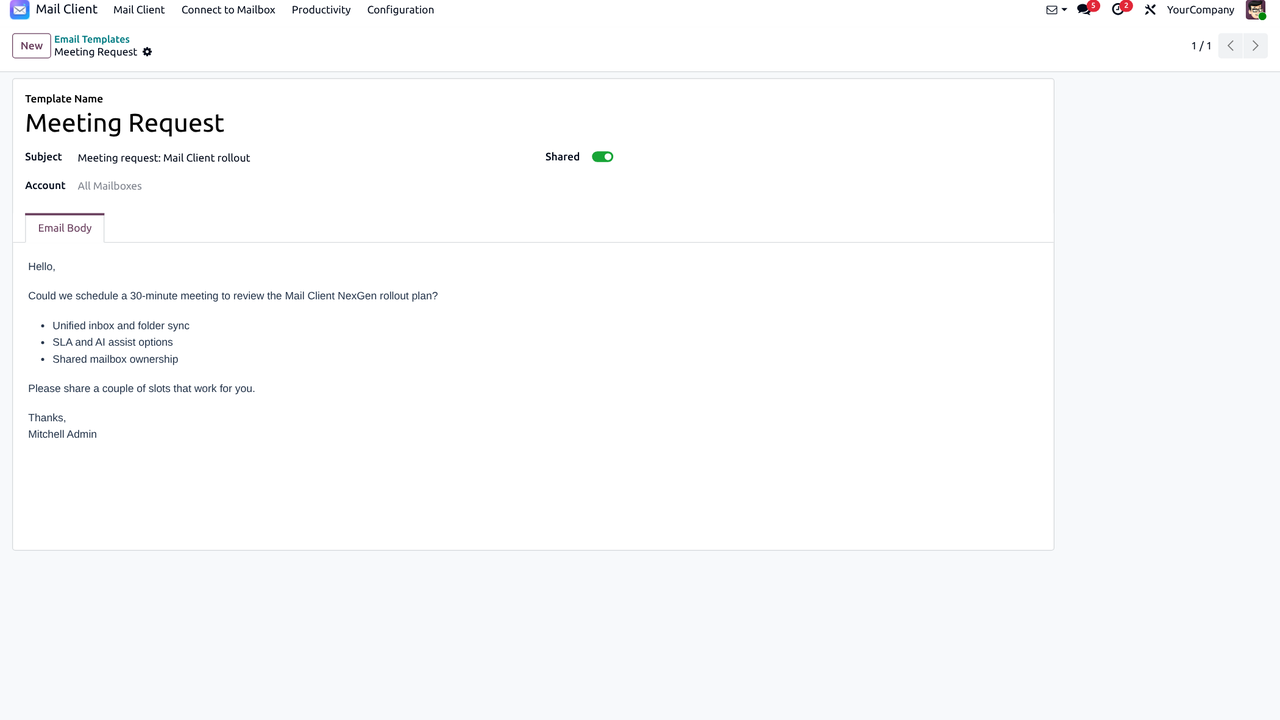
✓ Reusable templates
✓ Insert while composing
✓ Team-ready content
✓ Faster replies
Email templates — this app
Feature 12

Schedule & snoozed messages

Snooze messages until later and use scheduled / deferred actions so follow-ups return when you need them — without cluttering the active inbox.
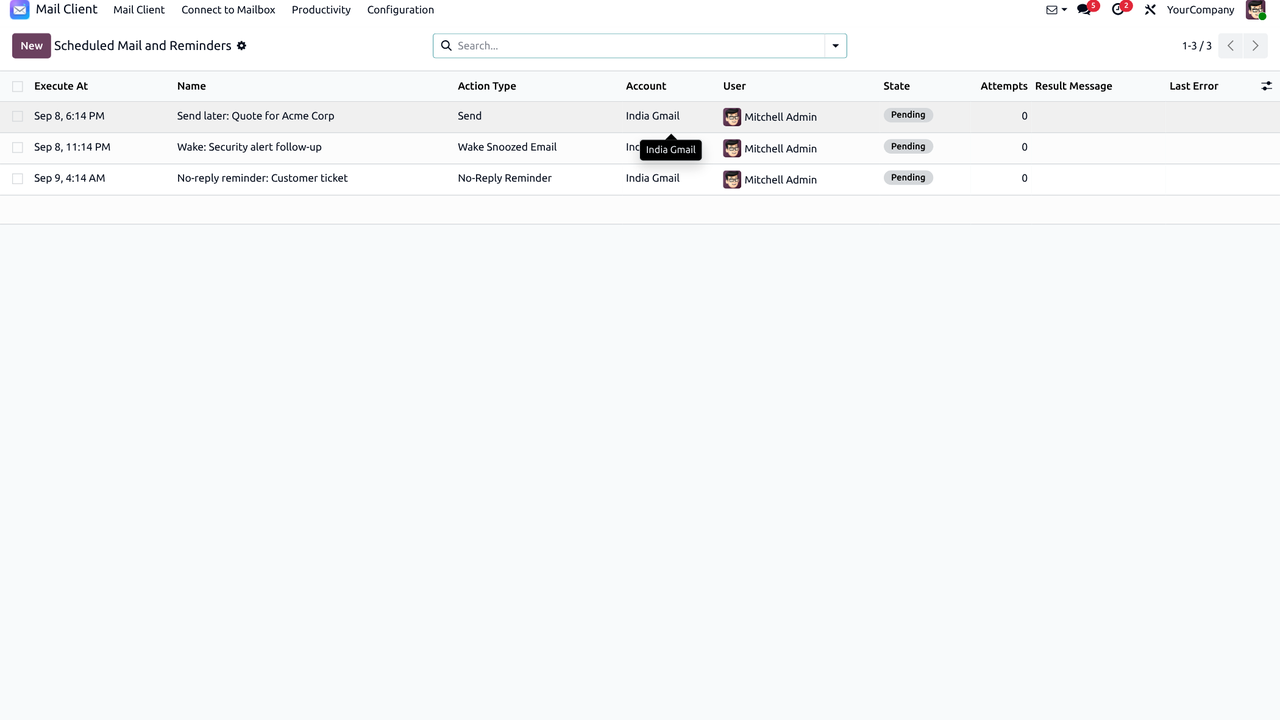
✓ Snooze until later
✓ Scheduled follow-ups
✓ Deferred actions
✓ Cleaner active inbox
Schedule and snooze — this app
Feature 10

SLA policies for service mail

Attach SLA policies with working calendars, first-response and resolution targets, warning thresholds and optional escalation users for shared-inbox style service mail.
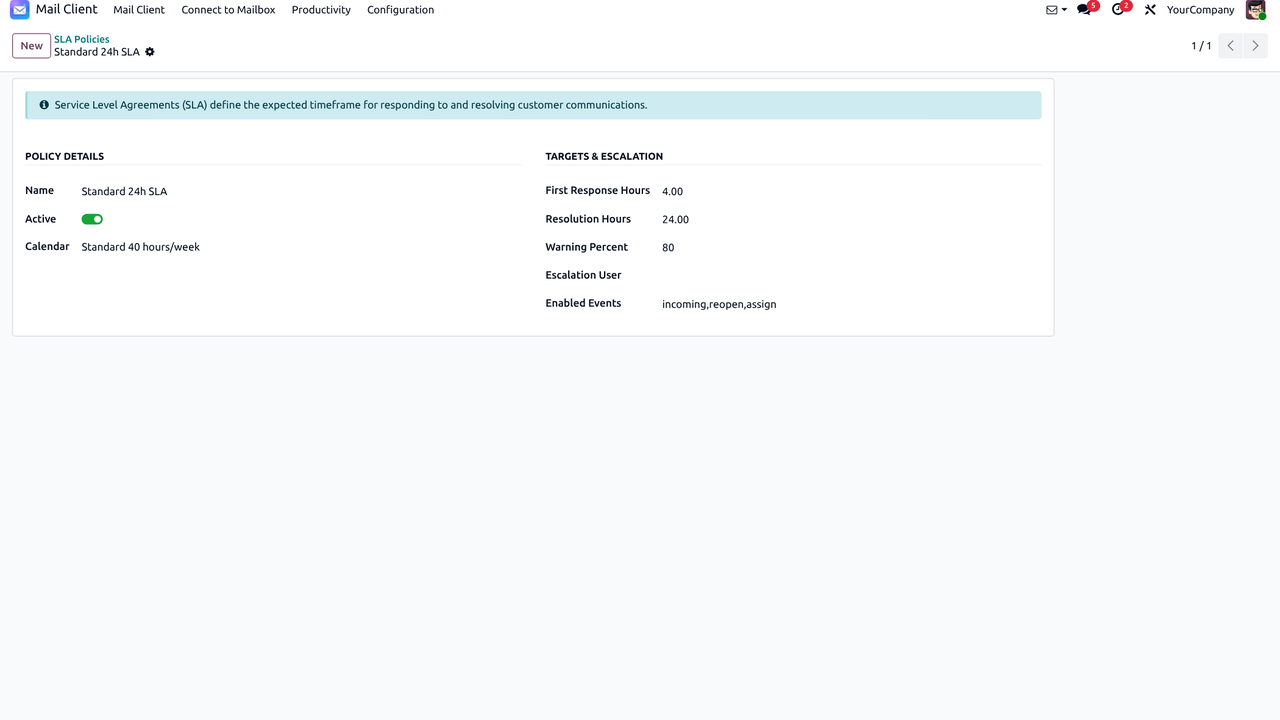
✓ Working calendars
✓ First-response targets
✓ Resolution targets
✓ Escalation users
SLA policies — this app
Teams & Odoo records

Shared inboxes, chatter compose & deep Odoo linking

Collaborate on support@ / sales@ style mailboxes, send from any record’s chatter with your Mail Client account, and attach conversations to the records that matter.

Feature 05

Shared team inboxes with roles

Share a mailbox with Viewer, Responder or Manager roles. Assign threads, leave internal comments and keep customer replies coordinated without forwarding chaos.
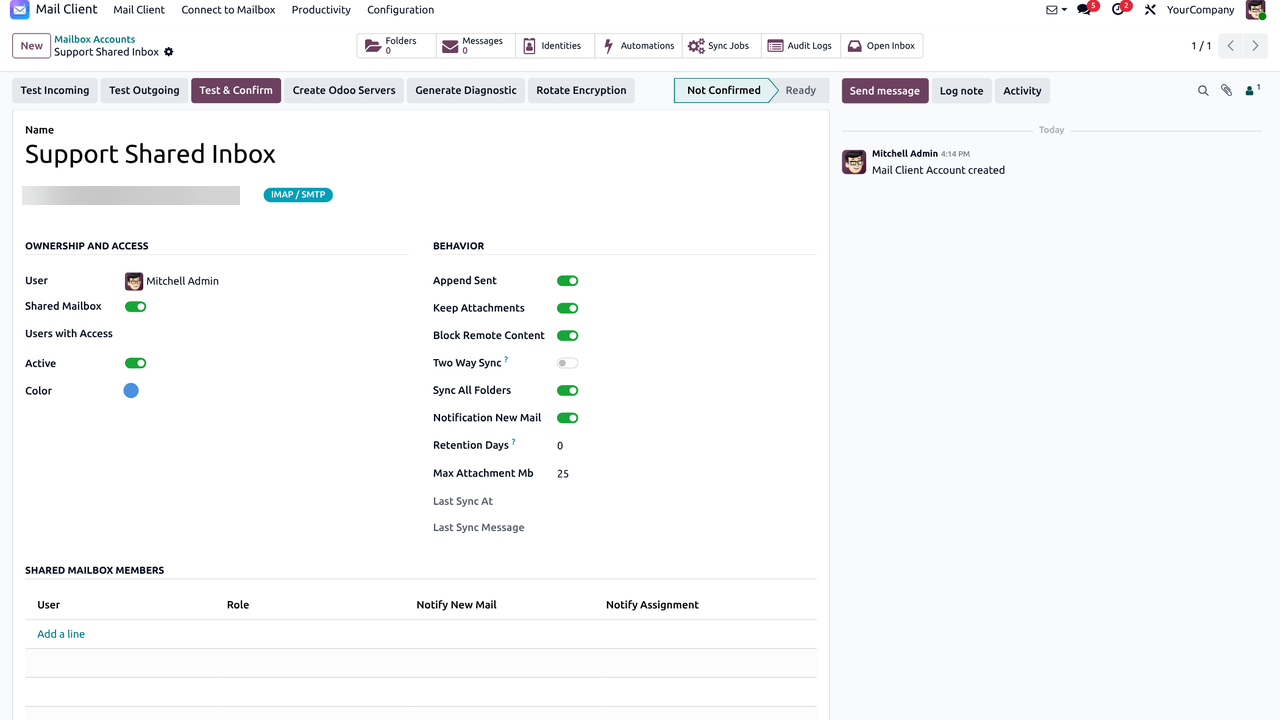
✓ Viewer / Responder / Manager
✓ Thread assignments
✓ Internal comments
✓ Notifications
Shared team inbox — this app
Feature 06

Link emails to CRM, Helpdesk, Project & more

Attach messages to leads, tickets, tasks, calendar events, documents and contacts so the conversation stays with the business record. Optional Native Discuss suite is available but disabled by default.
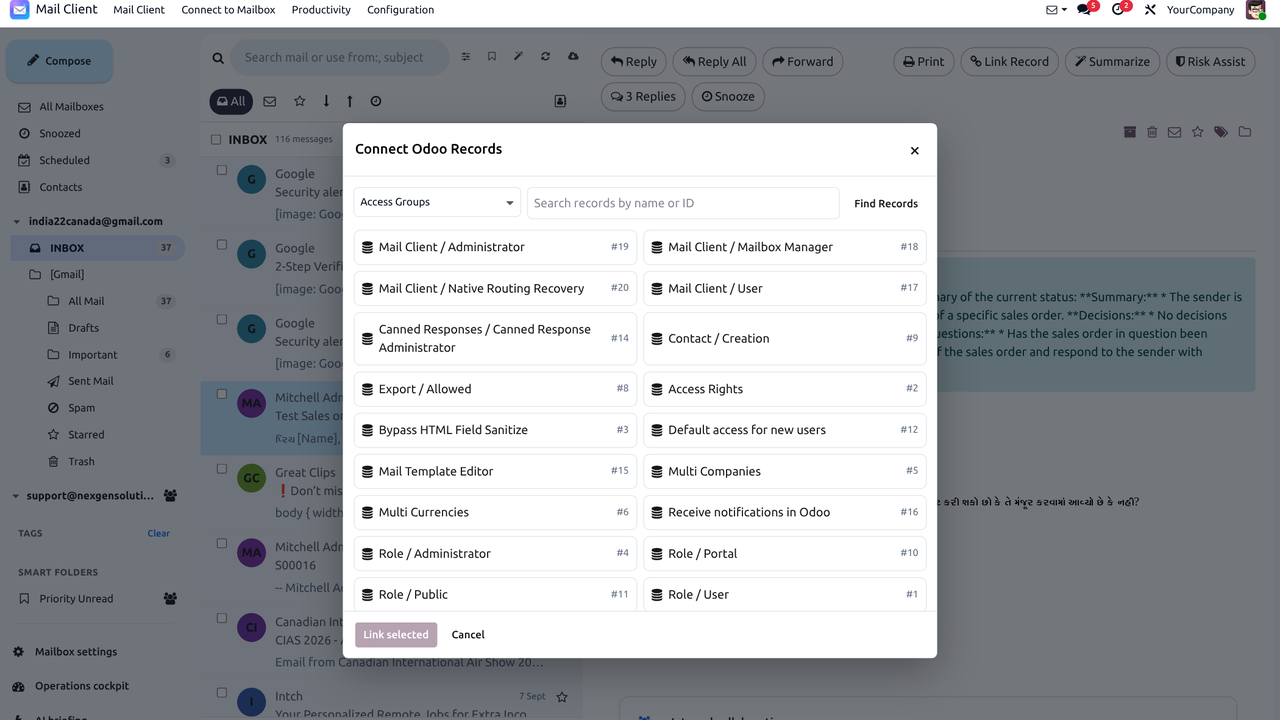
✓ CRM / Helpdesk / Project
✓ Calendar & Documents
✓ Contact linking
✓ Optional Native Discuss
Link emails to Odoo — this app
Feature 19 · Chatter

Send Message from any object chatter

On Contacts, CRM, Helpdesk, Projects and any other record with chatter, open Send Message and choose a Mail Client account. Set the From Name and add Cc / Bcc so replies leave from the right mailbox without switching to the Mail Client app.
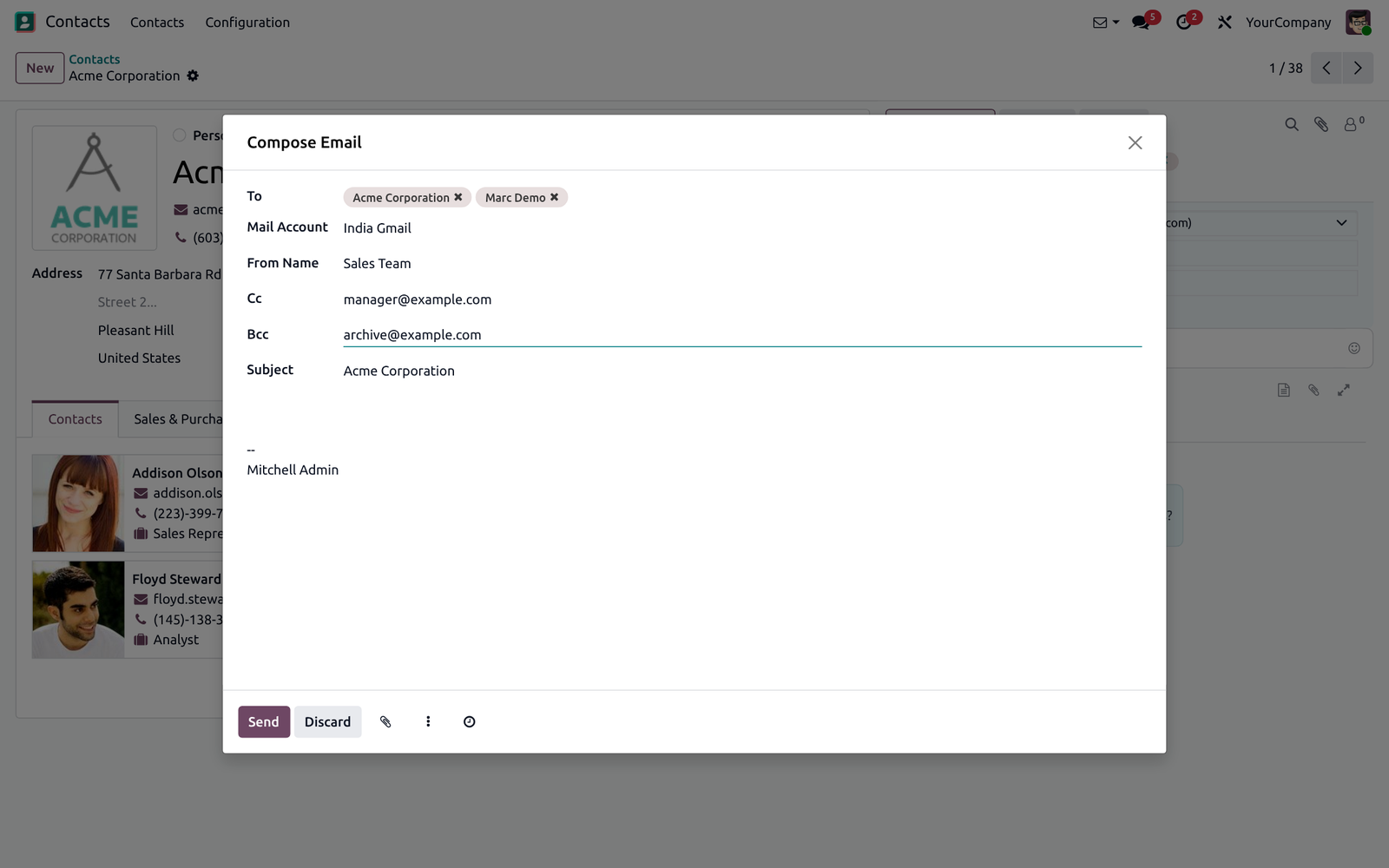
✓ Mail Account picker
✓ From Name
✓ Cc & Bcc
✓ Works on any chatter
Chatter Send Message with Mail Account, From Name, Cc and Bcc
Settings

Mailbox settings, appearance & organization

Tune themes, density, notifications and AI briefing, plus tags and smart folders so the workspace matches how your team works.

Feature 13

Configuration — themes, density, notifications

Configure mailbox preferences, appearance presets, reading density, notifications and optional AI briefing so each user can tune the client without leaving Odoo.
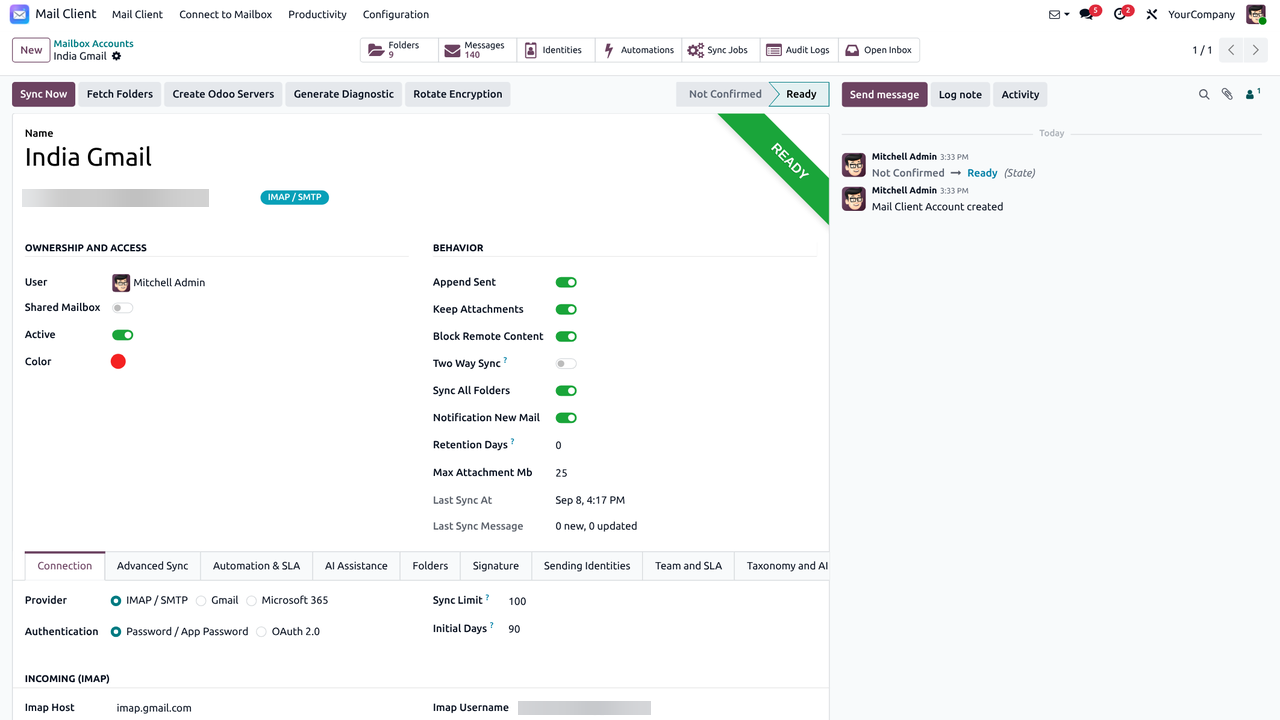
✓ Mailbox settings
✓ Themes & density
✓ Notifications
✓ AI briefing options
Mail Client configuration — this app
Organization

Tags, smart folders & appearance presets

Label messages with color tags, build smart folders for recurring searches, filter by linked partners and choose light / dark or layout presets for long reading sessions.

✓ Color tags
✓ Smart folder rules
✓ Partner / contact filters
✓ Light / dark themes
Tags, smart folders and appearance — this app
FAQ

Frequently asked questions

Answers about installation, providers, sync, AI, shared inboxes, security and support.

What does Mail Client NexGen do?

It is a native unified email workspace inside Odoo 19 for Gmail, Microsoft 365 and IMAP/SMTP mailboxes — with folders, threads, compose, tags, shared access, two-way sync, optional AI and linking messages to Odoo records.

Does it work on Odoo 19 Community and Enterprise?

Yes — Odoo 19 Community and Enterprise on Odoo.sh and on-premise. Third-party Apps Store modules are not available on Odoo Online (SaaS).

Do I need a developer to install and use it?

No for day-to-day use. Install from Apps, connect mailboxes from the UI, and work from the Mail Client menu. OAuth app credentials (Google / Microsoft) and optional push webhooks may need admin/IT setup once.

What is the technical name and license?

Technical name: mailclient_nexgen. License: OPL-1 (Odoo Proprietary License). Publisher: NexGen Solutions.

What are the dependencies?

Odoo modules: base, web, mail, contacts, resource. Python packages: cryptography and requests. Optional CRM / Helpdesk / Project / Calendar / Documents / Sales / Accounting features activate only when those apps are installed — no companion modules required.

Which email providers are supported?

Native Gmail API, Microsoft 365 / Graph (OAuth2 + PKCE), and generic IMAP/SMTP servers. You can mix multiple accounts and providers in one unified inbox.

Can I connect more than one mailbox?

Yes. Connect personal and shared mailboxes together and switch between All Mailboxes or a single account from the sidebar.

What does two-way sync cover?

Two-way sync is opt-in per mailbox. When enabled, flags, folder moves, reads and related mailbox actions stay aligned between Odoo and the remote server. When disabled, those actions update only Odoo’s local index and the UI makes that clear.

How often does mail synchronize?

A scheduled action polls active accounts (typically every two minutes). Use Sync Now on an account for an immediate bounded sync. Initial sync loads newest messages first; later runs use IMAP UIDs / provider cursors.

Is push / real-time delivery supported?

Optional provider push hooks are available when your deployment has a public HTTPS web.base.url. Gmail push also needs the system parameter mailclient_nexgen.gmail_pubsub_topic. If push is unavailable, scheduled polling continues to work.

How do OAuth connections work?

Gmail and Microsoft 365 use modern OAuth2 with PKCE, token refresh and API send where supported. Configure your Google / Microsoft app credentials once, then connect each mailbox from Odoo.

How are passwords and tokens stored?

Mailbox secrets and OAuth tokens are stored encrypted (cryptography). Prefer OAuth for Gmail and Microsoft 365; use IMAP/SMTP passwords only when required. For production, set a stable mailclient_secret_key in Odoo config; changing it later requires re-entering saved credentials.

Can teams share a mailbox (support@ / sales@)?

Yes. Shared inboxes support Viewer, Responder and Manager roles with assignments, internal status, due dates, private comments and triage workflows.

What collaboration features are included?

Assignments, open / waiting / done status, due dates, private internal comments, presence, undo for reversible triage, notifications, SLA policies and an operations cockpit for managers.

Does it support tags, smart folders and filters?

Yes. Color tags, private or shared smart folders (saved searches), quick filters (unread, starred, snoozed, incoming/outgoing), advanced search operators and contact-based filtering are included.

What can I do in the composer?

Rich HTML compose with autosaved drafts, reusable templates, multiple signatures, drag/drop attachments, reply / reply-all / forward, failed-send retry, SMTP or provider API send, and optional Sent-folder append.

Can I link emails to CRM, Helpdesk or Projects?

Yes. Link messages to Odoo records and optionally post to chatter. CRM, Helpdesk, Project, Calendar, Documents, Sales and Accounting integrations enable automatically when those apps are installed.

Can I send from a Mail Client account in record chatter?

Yes. On any object with chatter, open Send Message and choose a Mail Account, set the From Name, and optionally add Cc / Bcc. The message is sent through your connected mailbox and logged on the record.

Is AI required to use the module?

No. Reading, composing, sync and shared inboxes work without AI. AI is disabled until an administrator creates a provider and enables it on a mailbox.

Which AI providers are supported?

Configurable providers include OpenAI, Gemini, Anthropic, Grok, DeepSeek and local OpenAI-compatible endpoints. Availability depends on the credentials you configure.

What can AI do with my emails?

Opt-in features include thread summaries, reply suggestions, Q&A on grounded thread context, phishing assistance and automation routing. Automation never sends AI-generated mail automatically — a human remains in control.

Is my email data sent to an AI provider?

Only when AI is enabled by an administrator and used on a mailbox. Then the grounded thread context needed for the requested task may be sent to the configured provider. Review your provider’s privacy terms before enabling AI.

Does HTML reading stay safe?

Yes. The reader uses safe HTML handling for inbound messages, with attachment support and print-friendly views designed for everyday business mail.

Is dark mode available?

Yes. Choose Auto, Light or Dark, plus density and layout presets (including Gmail-inspired and Outlook-inspired styles) and text zoom.

Does it work on mobile / responsive layouts?

Yes. The OWL workspace is responsive with mobile-friendly panes for folders, message list and reading.

Are there keyboard shortcuts and drag-and-drop?

Yes. Keyboard shortcuts, context menus and drag-to-folder actions help power users triage mail faster, with Undo for reversible actions.

What is the Operations Cockpit?

A manager-facing view for mailbox health: sync jobs, leases, diagnostics, deliveries and related operational signals so admins can spot and recover stuck accounts.

Is there an audit trail?

Yes. Audit events and redacted diagnostics help you review important mailbox actions without exposing raw secrets in logs.

Does it support SLA on conversations?

Yes. Attach SLA policies with working calendars, first-response and resolution targets, warning thresholds and optional escalation users for shared-inbox style service mail.

Can I snooze messages or schedule actions?

Yes. Snooze messages until a later time and use deferred / scheduled actions where configured so follow-ups return when you need them.

Does it replace Odoo Discuss / Messaging?

No. It is a dedicated external-mail workspace that complements Odoo Discuss. An optional Native Discuss suite exists for advanced identity / routing scenarios and is disabled by default.

What is the optional Native Discuss suite?

An optional, company-policy-gated extension for managed sender identities, attachment reminders, scheduling presets, safe routing/recovery and audited edit/delete for non-delivered messages. Enable only the features you need after a security review.

Does the module support multiple languages?

Yes. It uses Odoo’s standard translation system. Translation catalogs are included (for example German, Spanish, French, Dutch, Portuguese, Polish, Turkish). Install and activate languages in Odoo to use them.

Does it support multi-company databases?

Yes. Mailboxes, policies and related records can be scoped by company so each company keeps its own email operations where needed.

Will this slow down my Odoo instance?

Sync is designed around scheduled incremental jobs, account leases and bounded Sync Now runs. Tune active accounts and cron intervals for your mailbox volume; large historical imports should be planned like any mail migration.

What happens if sync fails?

Durable sync jobs, progressive recovery and diagnostics help retry and surface account issues. Check the Operations Cockpit and account diagnostics, then use Sync Now after fixing credentials or provider limits.

Can I keep using Gmail or Outlook web too?

Yes. The mailbox remains on the provider. With two-way sync enabled, actions stay consistent between Odoo and the remote mailbox so teams can still use the provider UI when needed.

Is there a demo or trial?

Contact nexgensolutionsodoo@gmail.com for demo questions, configuration guidance or a walkthrough on your Odoo 19 database.

Can I open multiple Compose popups from the navbar?

Yes. The envelope icon in the Odoo systray opens a floating compose window. Click it again to open another independent popup beside the first — write several emails in parallel, then minimize or close each one separately.

What support is included?

OPL-1 · 90 days free support after purchase for installation, configuration and bug fixes. Email nexgensolutionsodoo@gmail.com.

Who publishes and maintains this app?

NexGen Solutions — website nexgensolutions.odoo.com · support nexgensolutionsodoo@gmail.com.

How do I get started quickly?

1) Install the app · 2) Open Mail Client · 3) Connect a Gmail / Microsoft 365 / IMAP account · 4) Sync folders · 5) Optionally enable two-way sync, shared roles and AI. Use Sync Now after the first connection to pull recent mail.

✦ Business value · built into Odoo Benefits of a native mail client

Keep email where work already happens

Mail Client NexGen turns external email into an Odoo-native workspace. Connect Gmail, Microsoft 365 and IMAP mailboxes, collaborate in shared inboxes, link messages to records, and keep triage next to CRM, Helpdesk, Project and Documents.

📧

Less context switching

Stop jumping between Gmail, Outlook and Odoo. Read, reply and triage from one workspace next to your business data.

  • • Unified multi-mailbox inbox
  • • Floating multi-compose popups
🔄

Two-way sync you can trust

Keep flags, folders, moves and read state aligned with the provider so the mailbox stays consistent wherever the team works.

  • • Folder sync & Sync Now
  • • OAuth2 / PKCE or IMAP
👥

Shared team inboxes

Give support, sales and operations a common mailbox with Viewer, Responder and Manager roles instead of shared passwords.

  • • Clear ownership & triage
  • • Internal collaboration notes
🔗

Email linked to Odoo

Connect threads to CRM, Helpdesk, Project, Calendar and Documents so conversations stay attached to the work they create.

  • • Link Record from the thread
  • • Less lost follow-up context
🤖

Optional AI assist

Summarize threads, draft replies and get risk hints with your configured provider — always review before send.

  • • OpenAI, Gemini, Claude & more
  • • Never auto-sends AI content

Productivity built in

Signatures, templates, snooze, schedule send, reminders and SLA policies keep service mail and follow-ups on track.

  • • Consistent brand replies
  • • First-response & resolution targets
🛠️

Operations visibility

Use the Operations Cockpit, sync jobs and diagnostics to spot stuck accounts and recover before customers notice.

  • • Mailbox health signals
  • • Audited, redacted diagnostics
💰

Lower stack cost

One connected module for inbox, sync, compose, shared access, AI, templates, SLA and Odoo linking — instead of stitching several tools.

  • • One purchase, one configuration model
  • • Community & Enterprise ready
01

Connect the mailbox

Add Gmail, Microsoft 365 or IMAP/SMTP and sync folders into Odoo.

02

Work as a team

Share inboxes, assign roles, compose in parallel and link emails to records.

03

Measure and improve

Use SLA, schedule/snooze, AI assist and the Operations Cockpit over time.

Why this module

One purchase vs browser mail + split add-ons

Stop stitching Gmail/Outlook tabs with separate sync, compose and AI tools. Get a full Odoo-native mail workspace in a single connected module.

Best value — one purchase

Mail Client NexGen

One module. One price. Unified inbox, sync, compose, shared access and Odoo linking.

  • Multi-mailbox workspace inside Odoo
  • Two-way sync, folders & OAuth2 / IMAP
  • Shared inboxes, SLA, templates & AI assist
  • Link emails to CRM, Helpdesk, Project & more
Compared to split approaches

Browser mail + extra apps

Keep mail outside Odoo, then buy add-ons to catch up.

  • Constant tab switching away from Odoo
  • Shared passwords or incomplete team mail
  • Sync / AI / SLA often sold separately
  • Weak link between emails and Odoo records
🧩

All-in-one coverage

Inbox, sync, compose, share, AI and ops in one module.

Faster daily work

Compose from the systray, triage in Odoo, link records instantly.

🤖

AI when you need it

Summaries, replies and risk assist — always human-reviewed.

📊

Built to operate

SLA, schedule/snooze, diagnostics and multi-company scope.

Capability-by-capability comparison

See what you get in one purchase versus browser mail plus split add-ons.

More value in one purchase
Capability Mail Client NexGen Browser mail + split apps
Unified multi-mailbox inbox inside Odoo Included External tabs only
Two-way sync, folders, OAuth2 / IMAP Included Often a separate sync app
Multi compose popups from the Odoo navbar Included Usually missing
Shared inboxes with roles & internal notes Included Shared passwords / limited
Link emails to CRM, Helpdesk, Project, Calendar Included Usually missing
Optional AI summarize, reply & risk assist Included Often another paid tool
Signatures, templates, SLA, schedule & snooze Included Usually incomplete

One connected platform — inbox, sync, compose, collaboration, AI and Odoo linking together.

Included with purchase

90 days free support after purchase

Installation, configuration guidance, questions and bug fixing from NexGen Solutions.

Installation Configuration Bug fixes Best-practice tips
Contact support
More from NexGen

Explore more NexGen Solutions apps

Browse the full NexGen Odoo 19 catalog — access, AI, dashboards, Gantt, hotel, construction, list views and more.
Ready for unified email inside Odoo?

Mail Client NexGen — multi-mailbox sync, shared inboxes, AI assist and Odoo linking · OPL-1 · NexGen Solutions